Full explanation
How Backlogs works in production
Study Backlogs in the specific context of Azure DevOps Organizations and Boards by connecting its mechanism to a production decision. First establish what owns the configuration or state, who or what invokes it, and which dependency must already be available. Then choose the user or system signal, instrument it, query it over a meaningful window, set context and thresholds, and connect alerts to action. Relate the result to the preceding Bugs concept and the following Sprints concept. The final proof is not that a command completed; it is that the intended behavior, control, and recovery path are observable and repeatable.
Purpose: turns service behavior into evidence that supports detection, diagnosis, capacity decisions, and measurable reliability.
Dependency context: connect Backlogs in Azure DevOps Organizations and Boards to the preceding Bugs concept and the following Sprints concept.
Validation: prove intended behavior and a controlled failure path with retained evidence.
Production ownership: document who changes, observes, approves, and recovers this capability.
Flow diagram
Backlogs execution flow
A repeatable sequence for learning, implementing, validating, and operating Backlogs.
- 01FrameState the concrete problem Backlogs must solve in Azure DevOps Organizations and Boards.
- 02InspectRead current configuration, dependencies, identity, state, and operational signals before changing anything.
- 03ImplementChoose the user or system signal, instrument it, query it over a meaningful window, set context and thresholds, and connect alerts to action.
- 04ValidateTest normal behavior, one realistic failure, and the evidence produced by Backlogs.
- 05OperateAssign ownership, monitoring, change control, and recovery guidance for the capability.
Flow diagram
Azure DevOps Organizations and Boards module flow
See where Backlogs fits in the wider Azure DevOps Organizations and Boards operating sequence.
- 01Establish organizationAzure DevOps Organizations and Boards stage 1: establish organization with an auditable result before the next stage begins.
- 02Create teamsAzure DevOps Organizations and Boards stage 2: create teams with an auditable result before the next stage begins.
- 03Model backlogAzure DevOps Organizations and Boards stage 3: model backlog with an auditable result before the next stage begins.
- 04Plan sprint or flowAzure DevOps Organizations and Boards stage 4: plan sprint or flow with an auditable result before the next stage begins.
- 05Execute linked workAzure DevOps Organizations and Boards stage 5: execute linked work with an auditable result before the next stage begins.
- 06Report outcomesAzure DevOps Organizations and Boards stage 6: report outcomes with an auditable result before the next stage begins.
Official Microsoft reference
Architecture diagrams from Microsoft documentation
Use these diagrams beside the original Edukron notes and flows to compare the learning model with the official product and architecture view.
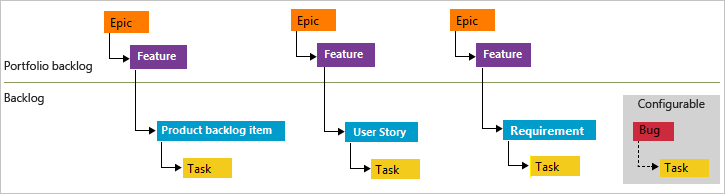
Azure Boards natural work-item hierarchy
Azure Boards uses portfolio, requirement, and task categories differently across Agile, Scrum, and CMMI processes; the hierarchy should support planning without deep same-category nesting.
Hands-on practice
Build and prove the behavior
- Create a minimal Backlogs example inside the set up a traceable delivery project lab.
- Record the configuration or command, expected result, observed evidence, and one negative test.
- Explain how identity, security, monitoring, and rollback apply before treating the exercise as complete.
Production considerations
Common mistakes and control checks
Collecting high-volume data without a decision, alerting on noise, or losing correlation between metrics, logs, traces, and deployments.
Treating Backlogs as a tool feature instead of a controlled part of the end-to-end Azure DevOps Organizations and Boards flow.
Keeping only a successful screenshot while discarding the configuration, test conditions, logs, and recovery evidence.
Knowledge check
Confirm that you can explain and apply it
01What problem does Backlogs solve, how does it work in Azure DevOps Organizations and Boards, and what is it commonly confused with?
Define the mechanism and ownership boundary first. Explain that it turns service behavior into evidence that supports detection, diagnosis, capacity decisions, and measurable reliability, then contrast it with the adjacent responsibilities represented by the preceding Bugs concept and the following Sprints concept. Close with a concrete validation signal.
02How would you implement and validate Backlogs for a production workload?
Start from workload constraints and existing state. Choose the user or system signal, instrument it, query it over a meaningful window, set context and thresholds, and connect alerts to action. Include identity, dependencies, normal and failure tests, monitoring, and an explicit recovery decision.
03A change involving Backlogs causes a production symptom. What evidence would you inspect and how would you recover safely?
Establish scope and recent change, inspect the native configuration and event or log evidence, test the dependency boundary, apply the smallest reversible mitigation, verify user impact has recovered, and retain the findings for permanent prevention.